

Show the timezone for datetimes in the Django admin
Django supports storing dates in a database as UTC but displaying them in some other timezone - which is good. But… by default datetimes are shown in the Django admin interface without any clue as to what timezone they are being displayed in.
This is really confusing. A time may be stored as UTC in the database but in the admin interface it’s displaying in PST, without any visual indication as to what is going on.
I found a pattern today for improving this. You can use django.conf.locale.en.formats to specify a custom date format for a specific locale (thanks, Stack Overflow). Then you can use the e date format option to include a string indicating the timezone that is being displayed, as documented here.
In settings.py do this:
from django.conf.locale.en import formats as en_formats
en_formats.DATETIME_FORMAT = "jS M Y fA e"I added a middleware to force the displayed timezone for every page on my site to America/Los_Angeles like so:
from django.utils import timezoneimport pytz
class TimezoneMiddleware: def __init__(self, get_response): self.get_response = get_response
def __call__(self, request): timezone.activate(pytz.timezone("America/Los_Angeles")) return self.get_response(request)I put this in a file called core/timezone_middleware.py and added it to my MIDDLEWARE setting in settings.py like so:
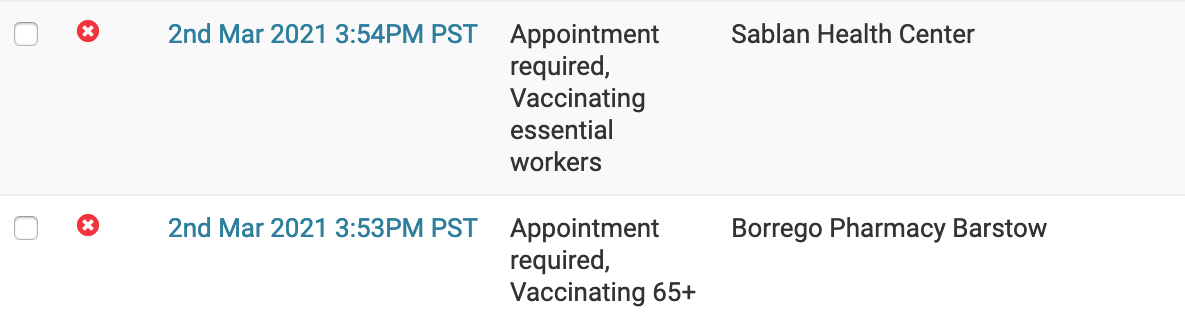
MIDDLEWARE = [ # ... "core.timezone_middleware.TimezoneMiddleware",]Now datetimes show up in my admin interface looking like this, with a PST suffix:
Showing UTC too
I decided I’d like to see the UTC time too, just to help me truly understand what had been stored. I did that by adding the following method to my Django model class:
# Earlierfrom django.utils import dateformatimport pytz
# Added to the model class:
def created_at_utc(self): tz = pytz.UTC created_at_utc = timezone.localtime(self.created_at, tz) return ( dateformat.format(created_at_utc, "jS M Y fA e") )Then I added created_at_utc to both the list_filter and the readonly_fields tuples in the admin configuration for that model. This caused it to show up in the list view and also as a read-only field at the bottom of the edit view.

Note that I’m calling dateformat.format() in the method and returning a string - this ensures Django’s automatic formatting doesn’t get the chance to convert it back to PST again.