

Querying newline-delimited JSON logs using AWS Athena
I’ve been writing my Fly logs to S3 in newline-delimited JSON format using the recipe described in Writing Fly logs to S3.
I recently needed to run a search against those logs. I decided to use AWS Athena.
(Scroll to the bottom for a cunning shortcut using GPT-3.)
The log format
My logs are shipped to S3 using Vector. It actually creates a huge number of tiny gzipped files in my S3 bucket, each one representing just a small number of log lines.
The contents of one of those files looks like this:
{"event":{"provider":"app"},"fly":{"app":{"instance":"0e286551c30586","name":"dc-team-52-simon-46d213"},"region":"sjc"},"host":"0ad1","log":{"level":"info"},"message":"subprocess exited, litestream shutting down","timestamp":"2022-09-27T20:34:37.252022967Z"} {"event":{"provider":"app"},"fly":{"app":{"instance":"0e286551c30586","name":"dc-team-52-simon-46d213"},"region":"sjc"},"host":"0ad1","log":{"level":"info"},"message":"litestream shut down","timestamp":"2022-09-27T20:34:37.253080674Z"} {"event":{"provider":"runner"},"fly":{"app":{"instance":"0e286551c30586","name":"dc-team-52-simon-46d213"},"region":"sjc"},"host":"0ad1","log":{"level":"info"},"message":"machine exited with exit code 0, not restarting","timestamp":"2022-09-27T20:34:39.660159411Z"}
This is newline-delimited JSON. Here’s the first of those lines pretty-printed for readability:
{ "event": { "provider": "app" }, "fly": { "app": { "instance": "0e286551c30586", "name": "dc-team-52-simon-46d213" }, "region": "sjc" }, "host": "0ad1", "log": { "level": "info" }, "message": "subprocess exited, litestream shutting down", "timestamp": "2022-09-27T20:34:37.252022967Z"}The challenge: how to teach Athena how to turn those files into a table I can run queries against?
Defining an Athena table
This was by far the hardest thing to figure out.
To run queries in Athena, you first need to create an external table that tells it how to read the data in your S3 bucket.
I was hoping I could just create a table with a single column full of JSON, and then run queries to extract the data I wanted.
I couldn’t figure out how to do that, so instead I figured out how to create a table that matched the schema of my JSON logs.
In the end, this example in the Athena docs helped me crack it.
Here’s my eventual solution:
CREATE EXTERNAL TABLE fly_logs ( timestamp string, host string, fly struct< app: struct< instance: string, name: string >, region: string >, log struct< level: string >, message string)ROW FORMAT SERDE 'org.openx.data.jsonserde.JsonSerDe'STORED AS INPUTFORMAT 'org.apache.hadoop.mapred.TextInputFormat'OUTPUTFORMAT 'org.apache.hadoop.hive.ql.io.IgnoreKeyTextOutputFormat'LOCATION 's3://datasette-cloud-fly-logs/'I ran that in the Athena query editor at https://us-east-1.console.aws.amazon.com/athena/home?region=us-east-1#/query-editor
As you can see, the key thing here is the section that defines the columns. I’m defining them to exactly match the structure of my JSON logs.
Because my logs include nested objects, I had to use struct< ... > syntax to define some of the columns.
Confusingly, at the base of the column definition columns are defined using column_name type - but within a struct< that changes to column_name: type. If you mix these formats up you get a confusing error message like this one:
FAILED: ParseException line 1:164 missing : at 'string' near '<EOF>'
Querying the table
Once the table is defined, running queries is pretty easy. I started with this one:
select * from fly_logs limit 10;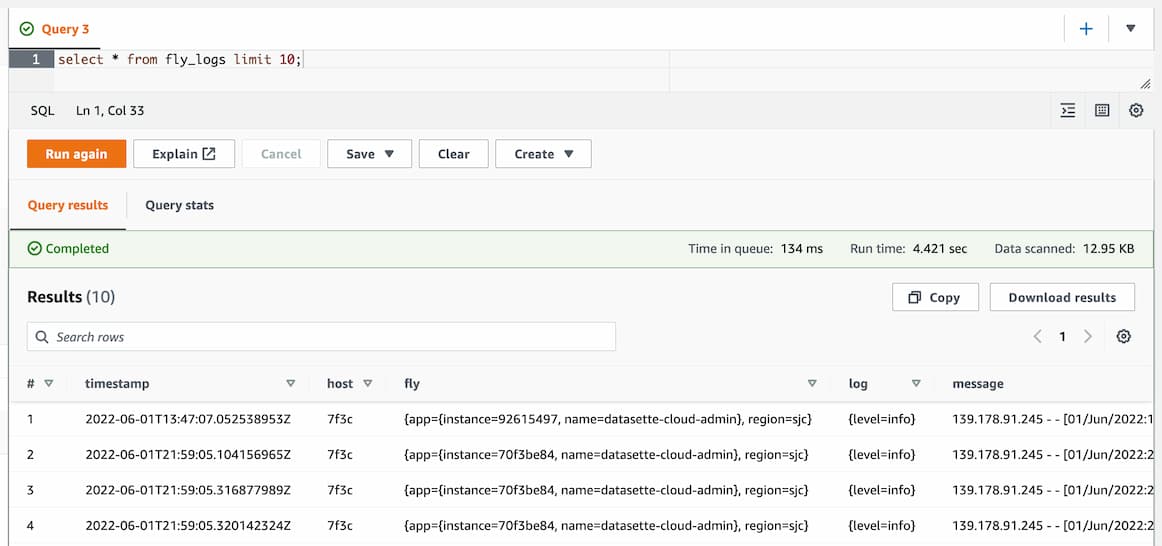
A count worked too:
select count(*) from fly_logs;To query nested objects, I used . syntax like this:
select timestamp, host, fly.app.name, log.level, messagefrom fly_logs_two limit 10;Finally, to search for a specific error message in the logs I ran this query:
select timestamp, host, fly.app.name, log.level, messagefrom fly_logs_twowhere message like '%sqlite3.OperationalError: no such table: _public_tables%'limit 100;Generating the configuration using GPT-3
Manually converting that JSON into a CREATE EXTERNAL TABLE definition is tedious and error-prone.
It turns out you can instead use the OpenAI GPT-3 language model to do that work for you!
Using the playground I tried the following prompt:
write an AWS Athena create table statement for querying this JSON data:
{ "event": { "provider": "app" }, "fly": { "app": { "instance": "0e286551c30586", "name": "dc-team-52-simon-46d213" }, "region": "sjc" }, "host": "0ad1", "log": { "level": "info" }, "message": "subprocess exited, litestream shutting down", "timestamp": "2022-09-27T20:34:37.252022967Z"}GPT-3 responded:
CREATE EXTERNAL TABLE IF NOT EXISTS logs ( event struct<provider:string>, fly struct<app:struct<instance:string.name:string>,region:string> host string, log struct<level:string>, message string, timestamp string)ROW FORMAT SERDE 'org.openx.data.jsonserde.JsonSerDe'LOCATION 's3://bucket/path/to/json/data/';