

Concatenating strings and newlines in Google Sheets
I was asked if there was a way to run shot-scraper against a list of URLs in a Google Sheet.
I came up with this example sheet which uses a formula to code-generate the YAML configuration needed by shot-scraper multi:

The formula is:
=if(isblank(A4), "", "- url: " & A4)The & character is used for string concatenation.
The if(condition, if-true, if-false) function is used to return an empty string if the cell is blank, or a concatenated string otherwise.
Adding newlines to the output text
I decided to try generating this output instead:
- url: https://simonwillison.net/ width: 800- url: https://datasette.io/ width: 800- url: https://www.example.com/ width: 800My first attempt was to include the newline in the formula - you can do this by hitting Ctrl+Enter while editing the cell:
=if(isblank(A2), "", "- url: " & A2 & " width: 800")This looks like it does the right thing:

But… when you copy and paste out the result, you get additional unwanted double quotes!
"- url: https://simonwillison.net/ width: 800""- url: https://datasette.io/ width: 800""- url: https://www.example.com/ width: 800"Thanks to this answer on StackOverflow I found a workaround.
Use char(13) where you want a newline. This is actually the character code for \r rather than \n - the result looks like this:
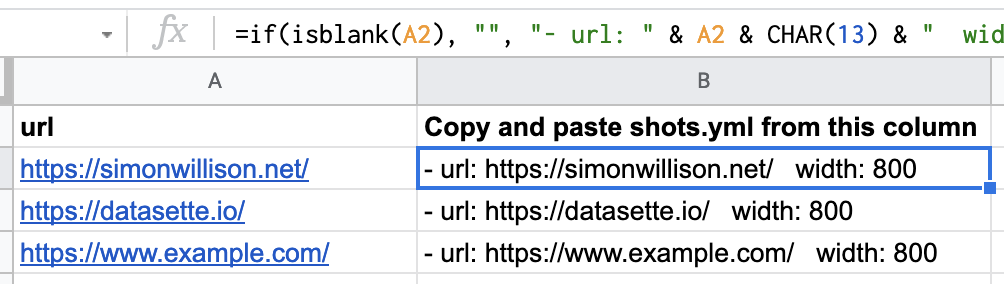
But… when you copy and paste out the column into a VS Code file you get this:
- url: https://simonwillison.net/ width: 800- url: https://datasette.io/ width: 800- url: https://www.example.com/ width: 800Hitting save in VS Code (for me on my Mac) resulted in a file with \n lines in it.
% python -c "print(repr(open('/tmp/saved.txt', 'rb').read()))"b'- url: https://simonwillison.net/\n width: 800\n- url: https://datasette.io/\n width: 800\n- url: https://www.example.com/\n width: 800'You can confirm that the original clipboard text contained \r and not \n by doing this:
% pbpaste | python -c 'print(repr(__import__("sys").stdin.buffer.read()))'b'- url: https://simonwillison.net/\r width: 800\n- url: https://datasette.io/\r width: 800\n- url: https://www.example.com/\r width: 800'