
Trying out SQLite extensions on macOS
Alex Garcia has been building some really cool new custom extensions for SQLite, working in C and Go. So far he’s released two:
- sqlite-lines, written in C, which adds
lines(text, optional-delimiter)andlines_read(filepath, optional-delimiter)table-valued functions, for processing files line-by-line. - sqlite-html, written in Go, which provides a whole family of functions for parsing and constructing HTML strings.
Both of these have interactive demos, which you can try out in your browser in Alex’s Observable notebooks:
- Introducing sqlite-lines - a SQLite extension for reading files line-by-line
- Introducing sqlite-html: query, parse, and generate HTML in SQLite
Getting them to run on a macOS laptop is harder. Here’s how I got them to work.
Don’t use the sqlite3 command that came with macOS
The sqlite3 command that comes built in to macOS has a frustrating limitation: it has been compiled without the ability to load new extensions.
You can confirm this by running the following:
sqlite3 :memory: 'select * from pragma_compile_options()'On my machine part of the ouput from this says OMIT_LOAD_EXTENSION.
You can run which sqlite3 to see where it is located - on my system that outputs /usr/bin/sqlite3.
If you use Homebrew you can run brew install sqlite - this will install a modern version of SQLite, but it won’t link it into your path (it’s a “keg-only package” in Homebrew jargon) to avoid conflicting with the macOS default installation. Running brew info sqlite confirms this.
% brew info sqlitesqlite: stable 3.39.2 (bottled) [keg-only]Command-line interface for SQLitehttps://sqlite.org/index.html/usr/local/Cellar/sqlite/3.39.2 (11 files, 4.4MB) Poured from bottle on 2022-07-24 at 14:46:49From: https://github.com/Homebrew/homebrew-core/blob/HEAD/Formula/sqlite.rbLicense: blessing==> DependenciesRequired: readline ✔==> Caveatssqlite is keg-only, which means it was not symlinked into /usr/local,because macOS already provides this software and installing another version inparallel can cause all kinds of trouble.
If you need to have sqlite first in your PATH, run: echo 'export PATH="/usr/local/opt/sqlite/bin:$PATH"' >> ~/.zshrc...So the command is installed but is not on your path. It lives at /usr/local/opt/sqlite/bin/sqlite3 - so you can run this version using that full path.
Running this confirms that it doesn’t have that OMIT_LOAD_EXTENSION option:
/usr/local/opt/sqlite/bin/sqlite3 :memory: \ 'select * from pragma_compile_options()'(It also reveals some exciting extra extensions: ENABLE_GEOPOLY and ENABLE_RTREE are both listed there.)
You can also download a precompiled SQLite binary for macOS from the SQLite downloads page - though this isn’t signed, so you’ll need to follow the steps described next to get it to run.
Download the .dylib files using wget
I figured this out after first writing this TIL. If you download a .dylib extension using wget it will work straight away:
% cd /tmp/tmp % wget https://github.com/asg017/sqlite-lines/releases/download/v0.1.1/lines0.dylib...Saving to: ‘lines0.dylib’/tmp % /usr/local/opt/sqlite/bin/sqlite3SQLite version 3.39.2 2022-07-21 15:24:47Enter ".help" for usage hints.Connected to a transient in-memory database.Use ".open FILENAME" to reopen on a persistent database.sqlite> .load lines0sqlite> .mode columnsqlite> select line ->> 'color' as color, sum(line ->> 'value') as sumfrom lines('{"color":"red","value":56}{"color":"red","value":79}{"color":"blue","value":52}{"color":"blue","value":15}') group by color;color sum----- ---blue 67red 135And for sqlite-html
Grab the html0.dylib extension from Alex’s releases page, again using wget:
% cd /tmp% wget https://github.com/asg017/sqlite-html/releases/download/v0.1.0/html0.dylib % /usr/local/opt/sqlite/bin/sqlite3sqlite> .load html0.dylibsqlite> select name from pragma_function_list where name like 'html_%';html_validhtml_counthtml_texthtml_texthtml_group_element_divhtml_attr_gethtml_attribute_hashtml_group_element_spanhtml_attr_hashtml_elementhtml_trimhtml_tablehtml_attribute_gethtml_extracthtml_versionhtml_debughtml_escapehtml_unescapesqlite> .mode columnsqlite> select * from html_each('<ul><li>Alpha</li><li>Bravo</li><li>Charlie</li><li>Delta</li>', 'li');html text---------------- -------<li>Alpha</li> Alpha<li>Bravo</li> Bravo<li>Charlie</li> Charlie<li>Delta</li> DeltaIf you download with your browser you’ll have to jump through more hoops
I first tried downloading the lines0.dylib file from the 0.1.1 release page.
The first time I tried loading the extension I got this error:
% /usr/local/opt/sqlite/bin/sqlite3sqlite> .load /Users/simon/Downloads/lines0.dylibError: dlopen(/Users/simon/Downloads/lines0.dylib.dylib, 0x000A): tried: '/Users/simon/Downloads/lines0.dylib.dylib' (no such file), '/usr/local/lib/lines0.dylib.dylib' (no such file), '/usr/lib/lines0.dylib.dylib' (no such file)macOS popped up up a helpful dialog box saing what went wrong:
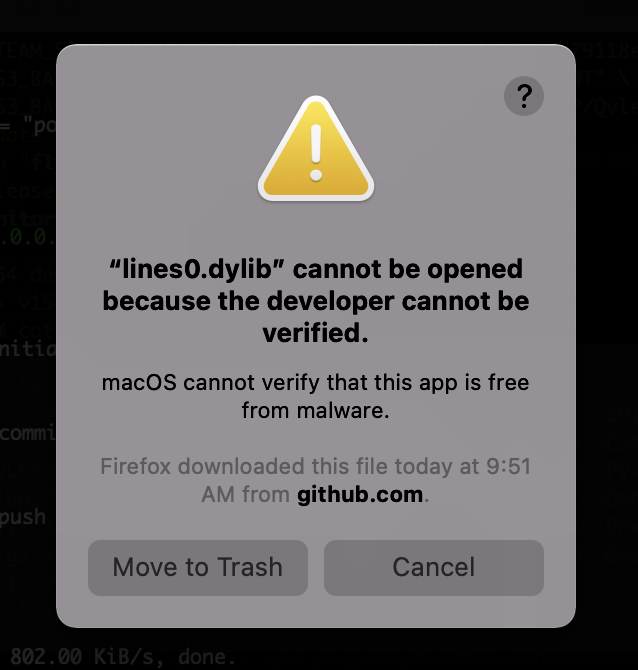
This is because the code hasn’t been signed. You can still open it though - the trick is to head over to the macOS Security tab in System Preferences:
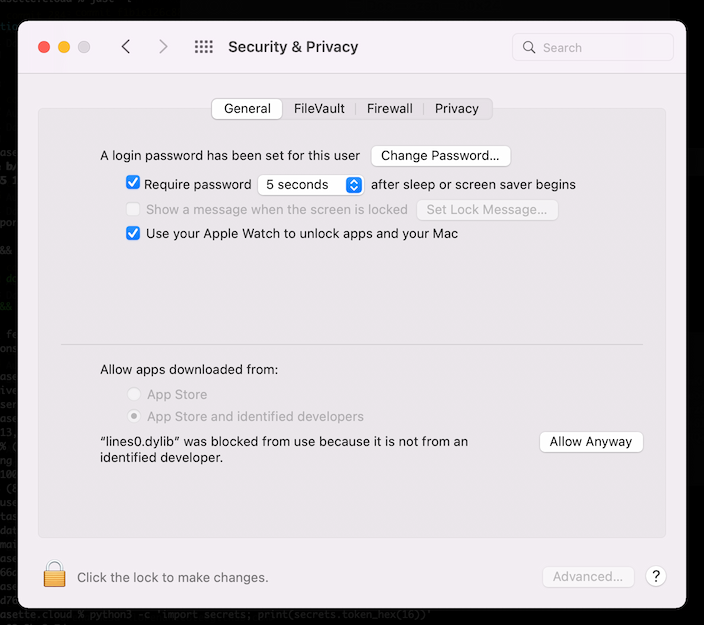
Click “Allow Anyway”, then try running the .load command again. Click “Open” one more time in this dialog:

And the extension will load from now on!