Geospatial SQL queries in SQLite using TG, sqlite-tg and datasette-sqlite-tg
TG is an exciting new project in the world of open source geospatial libraries. It’s a single C file (an amalgamation, similar to that provided by SQLite) which implements the subset of geospatial operations that I most frequently find myself needing:
- Handling GeoJSON, WKT and WKB formats
- Point in polygon checks
- Shape intersection checks
- Geospatial indexing to speed up the above
TG was released on Friday. I posted a note that “I think this could make the basis of a really useful SQLite extension—a lighter-weight alternative to SpatiaLite” in a couple of places…
… and Alex Garcia clearly agreed, because he built sqlite-tg over the weekend, and then packaged it up as a Python package, sqlite-utils and Datasette plugins, a Ruby gem, a Deno package and an npm package too!
It’s still an early alpha, but it’s actually very easy to try it out. Here’s how I got it working in Datasette.
Installation
Since Alex released it as a Datasette plugin, you can run this:
datasette install datasette-sqlite-tgConfirm installation with:
datasette pluginsThis should just work. In my case I ran into a problem because I’d previously installed an earlier alpha and needed to upgrade the underlying sqlite-tg dependency, which I did like this:
datasette install sqlite-tg==0.0.1a6This won’t be necessary for you if you are installing it for the first time.
Trying it out
sqlite-tg can work with three formats: WKT, WKB and GeoJSON.
These queries can be used to convert one to the other. Here’s how to convert a WKT bounding box around San Francisco to GeoJSON:
select tg_to_geojson('POLYGON(( -122.51610563264538 37.81424532146113, -122.51610563264538 37.69618409220847, -122.35290547288255 37.69618409220847, -122.35290547288255 37.81424532146113, -122.51610563264538 37.81424532146113))')This outputs (after pretty-printing):
{ "type": "Polygon", "coordinates": [ [ [-122.51610563264538, 37.81424532146113], [-122.51610563264538, 37.69618409220847], [-122.35290547288255, 37.69618409220847], [-122.35290547288255, 37.81424532146113], [-122.51610563264538, 37.81424532146113] ] ]}This is already useful: an easily installed mechanism for converting between WKT and GeoJSON with a SQL query is a great thing to have.
Let’s convert a point within San Francisco to WKB binary format:
select hex(tg_to_wkb('POINT(-122.4075 37.787994)'))Outputs:
0101000000AE47E17A149A5EC0DCB8C5FCDCE44240We can convert that back to GeoJSON like this:
select tg_to_geojson(x'0101000000AE47E17A149A5EC0DCB8C5FCDCE44240')This is using SQLite’s x'...' syntax to treat a hexadecimal string as a blob literal.
And here’s how to confirm that our point exists within our polygon bounding box for San Francisco:
select tg_intersects('{ "type": "Polygon", "coordinates": [ [ [-122.51610563264538, 37.81424532146113], [-122.51610563264538, 37.69618409220847], [-122.35290547288255, 37.69618409220847], [-122.35290547288255, 37.81424532146113], [-122.51610563264538, 37.81424532146113] ] ]}', 'POINT(-122.4075 37.787994)')I’m mixing GeoJSON and WKT here. I get back:
1Because the point and the polygon intersect.
Instead of using the WKT POINT(...) string here we can use the tg_point(longitude, latitude) function. We’ll use that in the next example.
Let’s try with Times Square in New York:
select tg_intersects('{ "type": "Polygon", "coordinates": [ [ [-122.51610563264538, 37.81424532146113], [-122.51610563264538, 37.69618409220847], [-122.35290547288255, 37.69618409220847], [-122.35290547288255, 37.81424532146113], [-122.51610563264538, 37.81424532146113] ] ]}', tg_point(-73.985130, 40.758896))And we get back:
0Let’s try something a bit more challenging.
Timezone lookups
I’ve worked with timezone lookups using SpatiaLite and Datasette before - I even wrote a tutorial about it.
I decided to try implementing a version of that on top of sqlite-tg.
I grabbed the latest release of timezones.geojson.zip from evansiroky/timezone-boundary-builder/ and unzipped it to get a combined.geojson file that starts like this:
{ "type": "FeatureCollection", "features": [ { "type": "Feature", "properties": { "tzid": "Africa/Abidjan" }, "geometry": { "type": "Polygon", "coordinates": [ [ [ -5.440683, 4.896553 ], [ -5.303699, 4.912035 ],Then I loaded that into a SQLite database table using this sqlite-utils mechanism (explained in What’s new in sqlite-utils 3.20 and 3.21: —lines, —text, —convert).
sqlite-utils insert timezones.db timezones combined.json \ --text --convert 'import json
def convert(s): data = json.loads(s) for feature in data["features"]: tzid = feature["properties"]["tzid"] yield {"tzid": tzid, "geometry": feature["geometry"]}' --pk tzidThis Bash one-liner loads the entire combined.json file (140MB of it) into memory and then runs a snippet of Python to loop through all of those features and yield {"tzid": "...", "geometry": {...}} dictionaries for each timezone.
sqlite-utils then creates a table with this schema and inserts those records as JSON strings:
CREATE TABLE [timezones] ( [tzid] TEXT PRIMARY KEY, [geometry] TEXT);The resulting database file is 160MB. You can download a copy from here.
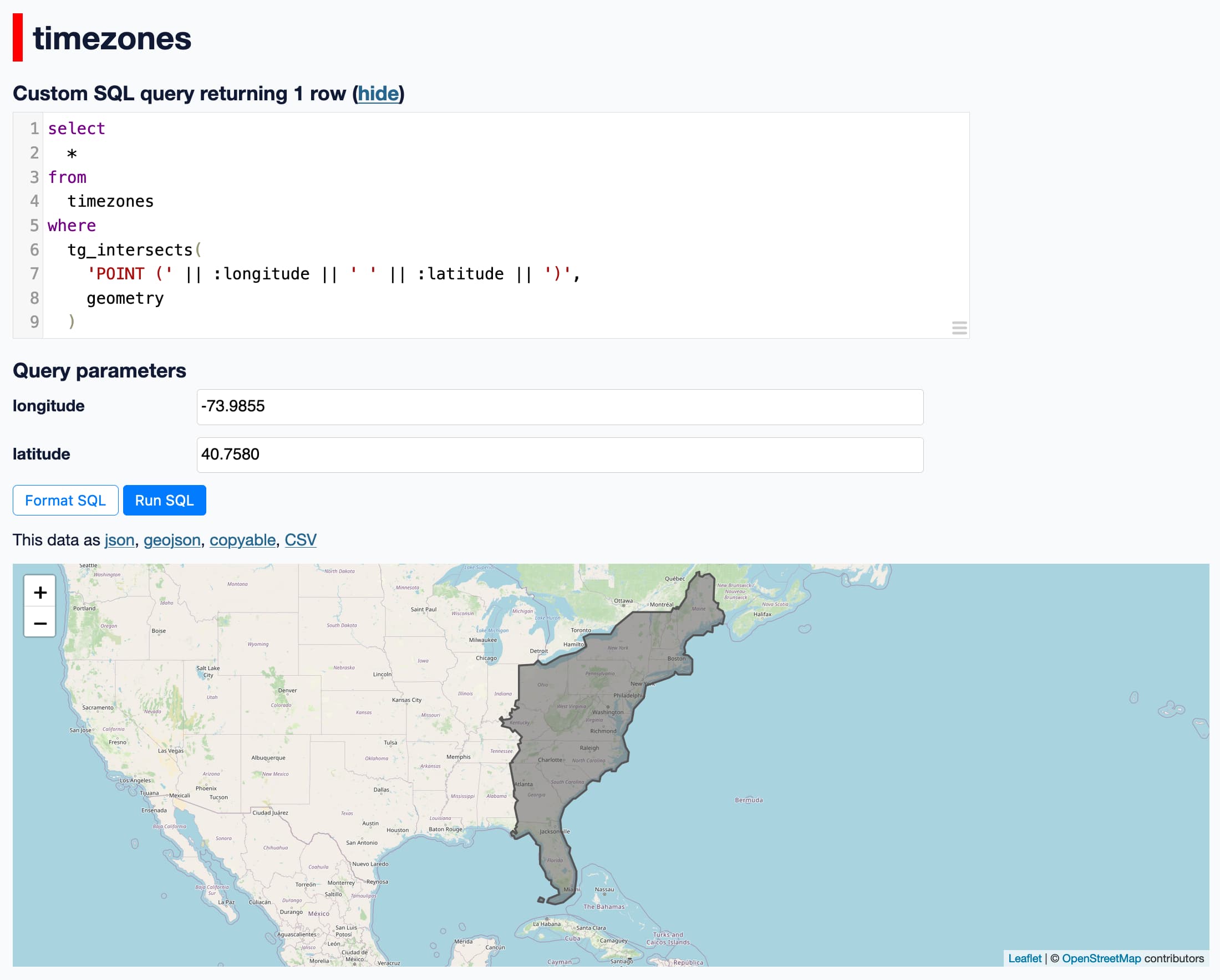
Here’s a query that can be used to find the timezone for a latitude/longitude pair:
select tzidfrom timezoneswhere tg_intersects( 'POINT (' || :longitude || ' ' || :latitude || ')', geometry )I started Datasette like this:
datasette timezones.dbAnd ran that query using the http://localhost:8001/timezones page.
And it worked! It returned the correct timezone for the different points I tried.
The query takes around 700ms on my M2 MacBook Pro. That’s not a great number - usable, but pretty taxing - but it’s also not a huge surprise since this is the most naive implementation of this possible - it’s doing a brute force geometry check against 160MB of JSON strings in the table.
sqlite-tg doesn’t yet include support for indexing. TG provides some very interesting indexing mechanisms as part of the library.
And for added fun… I installed the datasette-geojson-map plugin and added select * to the query and I got this!